
 LIFEsimMC
Usage
LIFEsimMC can cover many different use cases due to its modular pipeline architecture, but also features presets for the most common use cases consisting of predefined pipelines.
This page provides a brief overview of the different ways to use LIFEsimMC.
Note
LIFEsimMC is designed to run on both CPUs and GPUs. The use of GPUs is recommended, as the simulation gets computationally expensive quickly and may take a substantial amount of time on CPUs.
Presets (Recommended)
Single-Epoch Observation Preset
The single-epoch observation preset is the standard use case of LIFEsimMC, returning the extracted planet spectrum with uncertainties
after a single observation with the reference design of LIFE. It can be accessed through graphical user interface (GUI) or the Python API.
Have a look at the single-epoch observations tutorial for instructions how to use it.
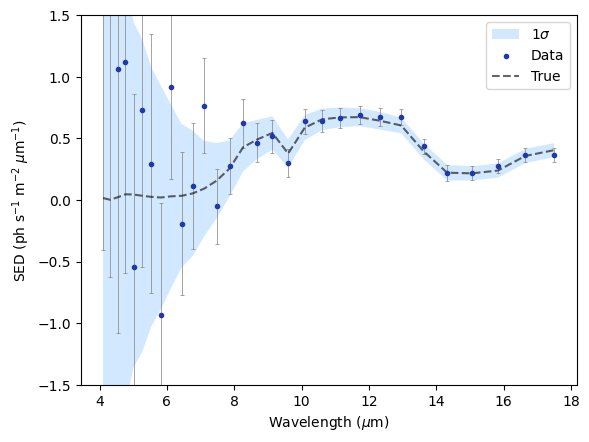
Spectral energy distribution extracted after a single-epoch observation.
Custom Pipeline (Advanced)
For custom use cases, the user can create their own pipeline and add custom modules to it. Results between modules are shared through so-called resources. Have a look at the advanced tutorials for examples pipelines.
The following code snippet gives a quick overview of the main workflow when using pipelines and modules:
# Create the pipeline
pipeline = Pipeline()

# Create and add a module with an output resource named 'a' and another argument that is not a resource
module = AModule(n_a_resource_out='a', some_argument=42)
pipeline.add_module(module)

# Create and add a second module with an input ('a') and output resource named 'b'
module = BModule(n_a_resource_in='a', n_b_resource_out='b')
pipeline.add_module(module)

# Run the pipeline
pipeline.run()

# Get the output resource named 'b' of the second module
b = pipeline.get_resource('b')
Specifying User Input
LIFEsimMC requires the specification of an Observation, an Instrument and a Scene object
(see Observation documentation, Instrument documentation or Scene documentation).
This is done via the SetupModule. There are two ways to set up the simulation:
Option 1: Creating Objects Manually
The first way is to manually create the Observation, Instrument and Scene objects.
After their creation, they can directly be given as input to the SetupModule:
obs = Observation(...)
inst = Instrument(...)
scene = Scene(...)

module = SetupModule(n_setup_out='setup', observation=obs, instrument=inst, scene=scene)
pipeline.add_module(module)
Option 2: Using a Config File
Alternatively, LIFEsimMC can also be used with config files (see Config File Tutorial) and a Configuration object (see Configuration documentation):
module = SetupModule(n_config_out='config', configuration=Configuration(path=Path('path/to/config.py')))
pipeline.add_module(module)